Sunday, September 27, 2009

Sort Cancelation Policy

I started sending out emails stating the following:

Please be aware that the Flow Cytometry Facility will begin charging 1/2 of the originally reserved time for sorts that are canceled less than 24 hours in advance. Last minute cancelations result in lost revenue for the facility since it is highly unlikely someone will be able to occupy that freed time slot. We certainly understand when experiments go bad and sorting is not possible, and in those instances, we'd prefer that you call/email us to cancel rather than simply canceling your time online. Our current effort is aimed at penalizing those abusing the self-scheduling privileges. Please consider this as a friendly notification.

If you receive an email like this, it is because you canceled a sort reservation less than 24 hours in advance of the sort start time. Despite our efforts to get people to schedule sorts responsibly, on average, we're having 3 last minute cancellations per week. When these people cancel, they delete their time on the scheduling system anywhere between 30 minutes to 4 hours prior to the planned sort start time. What’s even more frustrating is that it seems to be the people who book large time slots (4+ hours) that tend to cancel last minute. So as much as 12-15 hours of prime sorting time can go unused per week. Of course, this is especially frustrating since there is a substantial wait time for sorting in the afternoon.

Now, as I say in the email, we certainly understand things go wrong, and will definitely give you the benefit of the doubt, but instead of just going to the online scheduler to cancel your sort, it is imperative to get a hold of someone in the flow lab and tell them personally that you will not use your sort time. Many times, we are spending 20 minutes setting up the instrument specifically for your sort...changing the tip, putting in the proper filters, aligning the appropriate lasers, etc... Also, we are sometimes aware of people who are 'standing by' just in case someone does cancel. If you can let us know immediately when your experiment goes awry so we can try to get someone scheduled for that time slot, we would greatly appreciate it.

How can you get a hold of us? Well, there are many ways, but here are the best ways.

  • Call the lab at 2-9212
  • send us an Instant Message at 'flowhelp' 'flowlabhelp'
  • Send an email to ucflow'at'gmail'dot'com
  • stop by the lab in Kovler 037

Keeping track of last minute cancellations is a real pain, and I hate doing it, so please try to schedule your sort time responsibly so I don't have to do this anymore. Remember, schedule what you need, use what you schedule. Thank you.

Monday, September 21, 2009

FlowJo Training

Thanks to all who attended the large and small-group FlowJo training sessions on September 16. It was very successful, and we do intend to repeat this at least yearly. Can't wait that long, you say? Well, FlowJo offers 'intro' type online training session on the 1st Friday of every month at 12PM C.S.T. All you need to do is at 11:55AM on the 1st friday of the month, click on the following link, sign-in, and you'll receive a toll-free number so you can listen-in as you watch the demonstration from your own computer. Here is the link: https://treestar.webex.com/treestar/j.php?ED=109322642&UID=1022933222

Additionally, the flow facility will train you on-demand 5-days a week, from 9AM - 5PM. You can schedule this by calling the facility at 2-9212, or sending an email ucflow@gmail.com. We're also throwing around the idea of having FlowJo open office hours once a week that you can bring down your data analysis questions, and get some personalized help. For example, we could set up a 2-hour time slot on Tuesday afternoons, and be available for any FlowJo questions you may have. If this sounds like a good idea, be sure to let us know.

Thursday, July 30, 2009

It's GLIIFCA Time!

Registration is now open for the 18th annual Great Lakes International Imaging and Flow Cytometry Association (GLIIFCA) meeting. As I've said in years past, this meeting is great for the following reasons. 1. It's all about flow cytometry and imaging (part techno-geek stuff, part scientific stuff); 2. It's dirt cheap ($80 registration fee); 3. If you bring a poster you can apply for a travel award and you'll get $100; 4. You get to hang out with David!!! This year's meeting will be held in Pittsburgh, PA. (So, yeah, $150 for a roundtrip ticket, but c'mon it's worth it). If you're at all interested in this, send us an email and I can give you all the details. Also, you can find some info on the meeting as well as the organization as a whole at the following url: http://www.gliifca.org. Also feel free to distribute the flyer (in jpeg format) in the body of this post to anyone you feel may be interested.

Wednesday, July 22, 2009

BioPlex Manager Software Upgraded to 5.0


Although the upgrade has been available for quite a while, we finally got our BioPlex upgraded to the new software. As far as actually running the instrument, there's not that much of a difference in the work flow that would require re-training. It should look very familiar to you. The new features, however, are very useful, and exist mostly in the reporting of the data, and some new regression tools. Probably the single best feature of the new software is the graphs module. You can actually create very useful graphs right inside the BioPlex Manager Software. It's probably graphs that you're already creating inside excel, but not you can quickly and easily create them within the software and export as an excel graph, or as a bitmap image file. The best part is that you can do this on all the data you've ever created with the BioPlex, and to illustrate that, I took a results file that was on the computer, opened it up in 5.0, and created this graph shown above. It's basically showing you 9 cytokine levels of 2 samples (X9 and X10) in a bar graph. This literally took about 5 seconds to set up. Pretty cool. I was able to figure out how to do this without reading the manual in about 3 minutes, so the software continues to be very user friendly. Let me know if you want me to show you any of the new features, or if you find something cool yourself, be sure to pass along the info to us.

Wednesday, June 24, 2009

Antibody Titrations


After the post below regarding the Alexa Dye conjugations, I had a few questions from users, not about the Alexa Dyes available, but about the titration, and choosing the optimal antibody concentration. Titrating your antibodies will go a long way towards achieving good quality flow cytometry data. A properly titered antibody will allow you to achieve the optimal separation between positive and negative without unnecessarily wasting antibody. This should appeal to you in multiple ways; better data, fewer experiments, and saving money. Below I will share with you the UCFlow, fool-proof method for antibody titration.

The first things to look at are, what's your antibody, which cells should I use to titrate, and in which state do the cells need to be for maximal staining? The 1st one's a no-brainer, but what you should be aware of is on which instrument (i.e. lasers and filters) you'll need to run this antibody:fluorochrome pair. Other things to be aware of is what is the species, specificity, and isotype of the antibody in question. This may impact what type of blocking may be necessary. For example, a rat anti mouse IgG2a may require the use of an anti-Fc receptor blocking antibody (for example 2.4G2) prior to staining in order to minimize non-specific binding of the native Fc receptors by the rat antibody. Another example would be if you needed to stain human blood cells with a rabbit anti-human Ig. In this case, you may pre-incubate the cells in normal rabbit serum to avoid non-specific staining. Next, we'll need some cells on which we'll titrate the antibody, and we'll need to know in which state these cells need to be in order to achieve max expression of the antigen. Take, for example anti-mouse CD44. CD44 is expressed on multiple cell types (bone marrow myeloid cells, peripheral T cells, etc...), and at different levels on the same cell type (upregulated on peripheral T cells), so you want to make sure there is enough antibody to sufficiently stain the highest expression level without using so much antibody that your background is too high. So, in a case like this, it may be better to either use mouse bone marrow, or perhaps activate peripheral lymphocytes to achieve the highest expression level you may encounter.

Now that we know what and with what we will test, we can proceed to the actual testing. If forced to take a stab in the dark at an optimal antibody concentration for flow cytometry, I'd guess 1ug of antibody in a final volume of 100ul of anywhere from a couple hundred thousand to a couple million cells. With this information, I generally start my titration 10 times that value, and stain my 1st sample with 10ug of antibody in 100ul of cells ( i typically use 500,000 cells, but that's not as important as keeping the volume of the sample consistent). From there, I do 3-fold serial dilutions down to 0.005ug, which gives a total of 8 tubes. I do all the staining in a 96 well plate, so each antibody being tested conveniently fits in 1 column. So the math pretty much goes like this. Take 15ul of the antibody (if stock is at 1mg/ml concentration) and put it into A1. Put 10ul of buffer into A2 - A8. Take 5ul from A1, mix into A2 (thereby creating a 3-fold dilution) and repeat serially down the plate. Be sure to remove the 5ul extra from A8 and discard. So, each well has 10ul of the properly diluted antibody. To each well, I add 90ul of previously blocked cells (remember, you were suppose to block the Fc receptor with 2.4G2 - this can be done in bulk prior to putting the cells into the wells). Incubate, 15 minutes at 4C, wash 2x with PBS + 1%BSA, and resuspend in 250ul of PBS +1%BSA. Also be sure to save a small amount of the cells alone (i.e. unstained) for setting up the instrument. Set up the cytometer with the appropriate lasers and filters, and collect data files. You may ask yourself, what if my stock antibody is at a lower concentration, or, what if I'm using an antibody with unknown concentration because the vendor only told me to use 1ul per "test." First, call the vendor and demand the concentration, they may not give it to you, but if enough people complain maybe they'll get the picture that real scientists like to work with known numbers not arbitrary ones like "tests." Secondly, if you are told to use 1ul per test, you can pretty much assume that's way too much antibody (since they want you to waste antibody so you'll buy more), so maybe my top concentration would be 3ul/test, and do a 3-fold dilution from there.

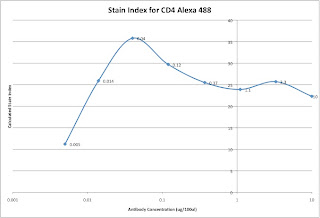
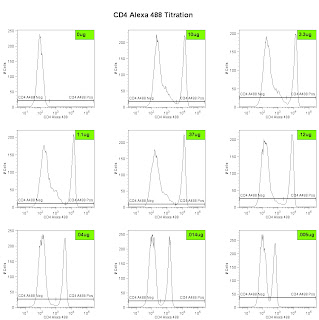
Lastly, we can analyze the data and generate the metric called the Stain Index. Perform standard gating of the population of interested (e.g. lymphocyte gate, live gate, myeloid gate, etc...). For the antibody titration channel, you will need to set a gate based on the 10ug sample which best separates the data into positive and negative groups. You'll then need to move the gates down as the positive population gets dimmer (see Titration Image). You can try to use the magnetic gate feature, but it doesn't always work that well. Once you have the positive and negative populations gated, you'll want to request the Standard Deviation of the negative population and the Median Fluorescence Intensity (MFI) of both neg and pos. The stain index can then be calculated as (MFIpos - MFIneg)/SDneg. A scatter plot of Log Antibody Concentration versus Stain Index should yield a curve whose max Stain Index is the optimal concentration (See Stain Index Image).

And there you go, a very easy way to get to the ideal concentration of antibody for flow cytometry. Remember, the concentration is critical, so we always try to stain in a final volume of 100ul. If you need to stain large numbers of cells, for example if you are sorting, then you'll need to increase the volume, and the concentration as well (probably never more than 1mL, though). If you plan to do this routinely, then a smaller scale titration (3 or 4 tubes instead of 8) may be necessary.

Friday, June 12, 2009

Alexa Dye Antibody Conjugation


The Fitch Monoclonal Antibody Facility (MAF) on campus is now offering antibodies coupled to many of the Alexa dye flavors from Invitrogen. As you may know, the Alexa Dyes are small molecular weight fluorochromes capable of producing bright fluorescence and minimal photo-bleaching. These dyes are available in many wavelengths, and are named by their optimal excitation wavelength, for example Alexa 488 is optimally excited by the 488 laser, while Alexa 568 is optimally excited by a 568nm Laser. The facility is offering commonly used antibodies coupled to various Alexa dyes for purchase in small and large aliquot sizes. The coupled antibodies will be tested and titrated by the Flow Cytometry Facility as a quality assurance measure. Most recently the MAF coupled Alexa 488 to a Rat anti-Mouse CD4 antibody (clone GK1.5), the titration is shown in the embedded image. For more information on which antibodies are slated to join the mix, or how you can get your homebrewed antibodies coupled to an Alexa Dye, contact the Monoclonal Facility at 702-8756, or contact the Technical Director, Carol McShan at mcs7 'at' uchicago 'dot' edu.

Thursday, May 21, 2009

Live from Beckman Coulter Big Bang Event

I'm here at the Embassy Suites in Rosemont, IL for the big event. I'll post some updates as the day progresses, and possibly a few pics as well. There's a pretty decent turnout, maybe about 50-75 people. We're just getting underway! More later.

0913: Picomotor driven laser steering optics for fine tuning laser alignment...awesome

0914: Gallios = Research Instrument, Navios = Clinical Instrument.

0917: A vendor has talked about instrument "sensitivity" without quoting MESF detection threshold values...There really is a God! It's good to see my ranting and raving has not been in vain.

0924: The boulevard. Coulter's answer to the "Octagon". 18 degree reflection system which minimizes light loss.

0930: Definitely some nice innovation on the light scattering front. "Enhanced FSC" mode allowed resolution of 0.4um beads from noise as well as from 0.5um beads.

0948: FCS file is packed with all the necessary information to reproduce the experiment. (MIFlow?, XML compatible?)

0958: PROService - Remote diagnostic of software/hardware issues. Can control laser picomotors for remote alignment.

1045: Why we are getting a lecture on tandem dyes is beyond me, but oh well, at least I can get some work done in the
meantime. Hopefully we'll get back to the instrumentation soon.

1105: Kaluza - Named after German Mathematician and Physicist Theodore Kaluza

1355: By the way, Kaluza is awesome. Super snappy! Eats up large data files like nothing. Still not too sure about the fancy new tools like Radar, but it could be useful.

1410: MoFlo XDP overview. pretty much what you'd expect. The one nice thing is Intellisort II, which is basically a 1-button stream setup and drop-delay calculation. It does everything from setting the frequency, drop drive amplitude, phase, drop delay, everything.

1530: The MoFlo Astrios - Pretty much an attempt to automate many of the tasks needed to set up the MoFlo. 7-pinholes, 6-way sorting. Interestingly, the 7-pinholes take up the same vertical space as the 3-pinholes did on the MoFlo-XDP. This basically means that the beam height must be really small (~10um high?). So does a fully loaded system not have huge amounts of crossbeam spillover? Even after appropriately ordering the beams (e.g. put the UV next to the 640nm, and keep the 488nm away from the 532nm, etc...) there is still going to be some problems. I can only imagine that the hope is most people will want a 4 or 5-laser system at most, and then they can stagger the lines a bit more. What's the likelihood one will want to run all 7 lasers at the same time...probably pretty low. the 7-pinhole thing may simply be a marketing tool, but I could easily be proven wrong once I see some data. Hopefully later this year then.

1600: That's about all. Hopefully if you weren't able to attend, you got a peek at what went on here. signing off.